
CCNA 4 Chapter 3 SIC PPP, Routing, and Remote Access VPN – PT Skills Assessment. Get all of the validated answers for the CCNA 4 Chapter 3 SIC PPP, Routing, and Remote Access VPN – PT Skills Assessment. Ideal for quick and fast review or getting ready for the actual test. if you have short time then you are on right place.
CCNA 4 Chapter 3 SIC PPP, Routing, and Remote Access VPN – PT Skills Assessment
This is the CCNA 4 Chapter 3 SIC PPP, Routing, and Remote Access VPN – PT Skills Assessment with 100% correct answers:
Chapter 3 SIC: PPP, Routing, and Remote Access VPN – Form 0
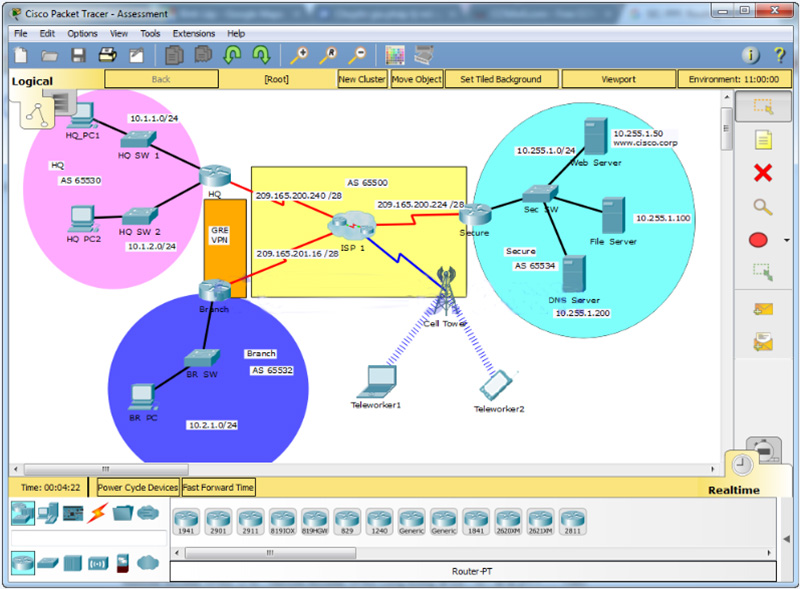
A few things to keep in mind while completing this activity:
- Do not use the browser Back button or close or reload any Exam windows during the exam.
- Do not close Packet Tracer when you are done. It will close automatically.
- Click the Submit Assessment button to submit your work.
Addressing Table
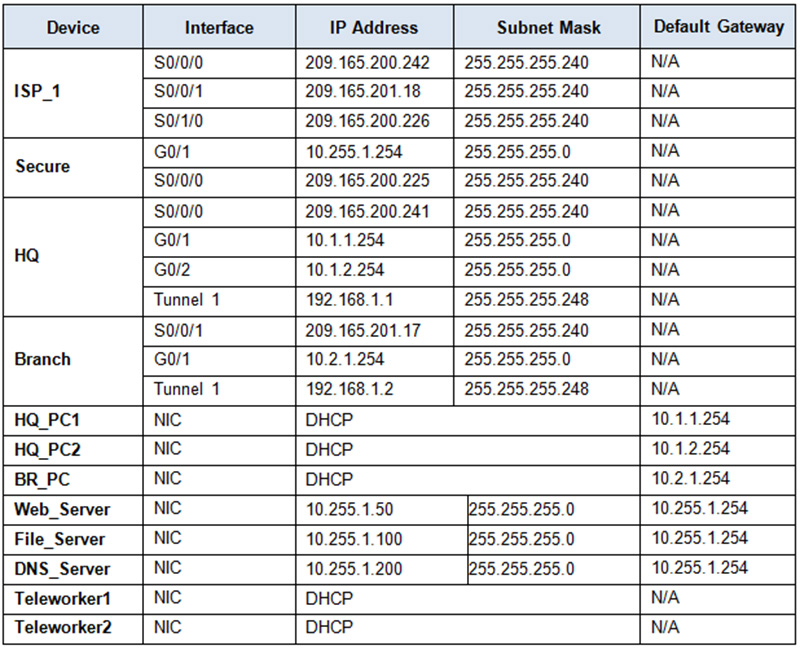
Note: All device console passwords are cisco. All device enable passwords are class.
Step 1: Configure HDLC on router Secure.
Configure the WAN link from router Secure to ISP_1 using HDLC encapsulation.
Step 2: Configure PPP to connect HQ to ISP_1.
Configure the WAN link from router HQ to ISP_1 using PPP encapsulation and CHAP authentication.
- Create a user ISP_1 with the password of cisco123.
Step 3: Configure eBGP routing.
- Configure router HQ with eBGP routing.
- Configure HQ to peer with ISP_1.
- Add only HQ 10.1.1.0/24 internal network to BGP.
- Configure router Branch with eBGP routing.
- Configure Branch to peer with ISP_1.
- Add the Branch internal network to BGP
Step 4: Configure GRE Tunneling.
- Configure router HQ with a tunnel interface to send IP traffic over GRE to Branch.
- Configure Tunnel 1 with appropriate addressing information.
- Configure the tunnel source with the local exit interface.
- Configure the tunnel destination with the appropriate endpoint IP address.
- Configure router Branch with a tunnel interface to send IP traffic over GRE to HQ.
- Configure Tunnel 1 with appropriate addressing information.
- Configure the tunnel source with the local exit interface.
- Configure the tunnel destination with the appropriate endpoint IP address.
Step 5: Configure OSPF Routing.
The Branch LAN must have connectivity to the HQ LAN. Configure OSPF across the GRE tunnel.
- Configure OSPF process 10 on the Branch router.
- Backup should advertise the LAN network via OSPF.
- Backup should be configured to form an adjacency HQ over the GRE tunnel.
- Disable OSPF updates on appropriate interface(s).
Step 6: Configure OSPF Routing.
The HQ LAN must have connectivity to the Branch LAN. Configure OSPF across the GRE tunnel.
- Configure OSPF process 10 on the HQ router.
- HQ should advertise both LAN networks via OSPF.
- HQ should be configured to form an adjacency with Branch over the GRE tunnel.
- Disable OSPF updates on appropriate interface(s).
Step 7: Connectivity.
- Verify full connectivity from Main_PC1 to the Web_Server in the Secure network.
- Verify full connectivity from Teleworker1 to Web_Server in the Secure network.
Answers:
Router: Secure / Storage / OffSite
User Access Verification

cisco  <~~~~Password is: cisco
en
class    <~~~~Password is: class
conf ter
int s0/0/0
encapsulation hdlc
Router: HQ / Corp / Main
User Access Verification

cisco  <~~~~Password is: cisco
en
class    <~~~~Password is: class
conf ter
username ISP_1 password cisco123
int s0/0/0
encapsulation ppp
ppp authentication chap
exit

router bgp 65530
network 10.1.1.0 mask 255.255.255.0
neighbor 209.165.200.242 remote-as 65500
exit


interface tunnel 1
ip address 192.168.1.1 255.255.255.248
tunnel source s0/0/0
tunnel destination 209.165.201.17
exit


router ospf 10
network 10.1.1.0 0.0.0.255 area 0
network 10.1.2.0 0.0.0.255 area 0
network 192.168.1.0 0.0.0.7 area 0
passive-interface g0/1
passive-interface g0/2
Router: Branch / Remote / Backup
User Access Verification

cisco  <~~~~Password is: cisco
en
class    <~~~~Password is: class
conf ter
router bgp 65532
network 10.2.1.0 mask 255.255.255.0
neighbor 209.165.201.18 remote-as 65500
exit

interface tunnel 1
ip address 192.168.1.2 255.255.255.248
tunnel source s0/0/1
tunnel destination 209.165.200.241
exit

router ospf 10
network 10.2.1.0 0.0.0.255 area 0
network 192.168.1.0 0.0.0.7 area 0
passive-interface g0/1
Chapter 3 SIC: PPP, Routing, and Remote Access VPN – Form 1
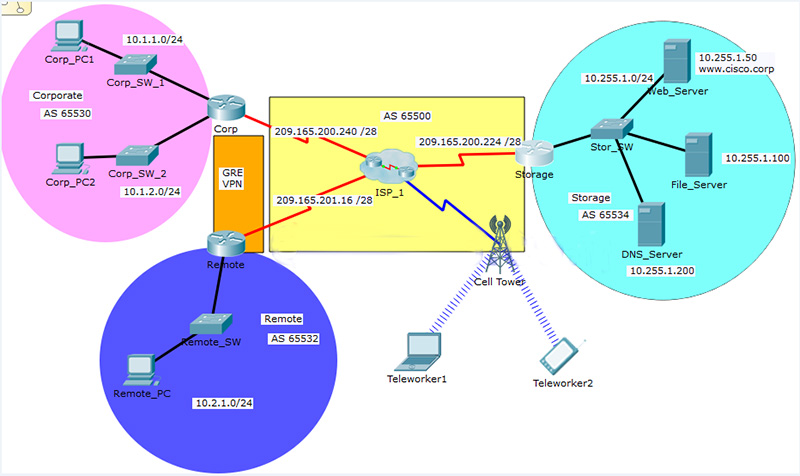
A few things to keep in mind while completing this activity:
- Do not use the browser Back button or close or reload any Exam windows during the exam.
- Do not close Packet Tracer when you are done. It will close automatically.
- Click the Submit Assessment button to submit your work.
Addressing Table
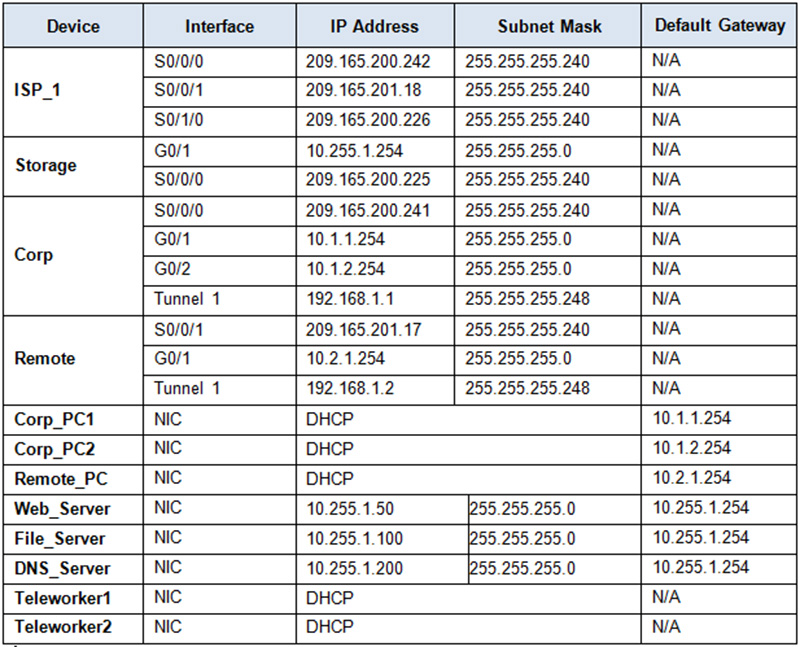
Note: All device console passwords are cisco. All device enable passwords are class.Step 1: Configure HDLC on router Storage.
Configure the WAN link from router Storage to ISP_1 using HDLC encapsulation.
Step 2: Configure PPP to connect Corp to ISP_1.
Configure the WAN link from router Corp to ISP_1 using PPP encapsulation and CHAP authentication.
Create a user ISP_1 with the password of cisco123.
Step 3: Configure eBGP routing.
- Configure router Corp with eBGP routing.
- Configure Corp to peer with ISP_1.
- Add only Corp 10.1.1.0/24 internal network to BGP.
- Configure router Remote with eBGP routing.
- Configure Remote to peer with ISP_1.
- Add the Remote internal network to BGP
Step 4: Configure GRE Tunneling.
- Configure router Corp with a tunnel interface to send IP traffic over GRE to Remote.
- Configure Tunnel 1 with appropriate addressing information.
- Configure the tunnel source with the local exit interface.
- Configure the tunnel destination with the appropriate endpoint IP address.
- Configure router Remote with a tunnel interface to send IP traffic over GRE to Corp.
- Configure Tunnel 1 with appropriate addressing information.
- Configure the tunnel source with the local exit interface.
- Configure the tunnel destination with the appropriate endpoint IP address.
Step 5: Configure OSPF Routing.
The Remote LAN must have connectivity to the Corp LAN. Configure OSPF across the GRE tunnel.
- Configure OSPF process 10 on the Remote router.
- Backup should advertise the LAN network via OSPF.
- Backup should be configured to form an adjacency Corp over the GRE tunnel.
- Disable OSPF updates on appropriate interface(s).
Step 6: Configure OSPF Routing.
The Corp LAN must have connectivity to the Remote LAN. Configure OSPF across the GRE tunnel.
- Configure OSPF process 10 on the Corp router.
- Corp should advertise both LAN networks via OSPF.
- Corp should be configured to form an adjacency with Remote over the GRE tunnel.
- Disable OSPF updates on appropriate interface(s).
Step 7: Connectivity.
- Verify full connectivity from Main_PC1 to the Web_Server in the Storage network.
- Verify full connectivity from Teleworker1 to Web_Server in the Storage network.
Answers:
Router: Secure / Storage / OffSite
User Access Verification

cisco  <~~~~Password is: cisco
en
class    <~~~~Password is: class
conf ter
int s0/0/0
encapsulation hdlc
Router: HQ / Corp / Main
User Access Verification

cisco  <~~~~Password is: cisco
en
class    <~~~~Password is: class
conf ter
username ISP_1 password cisco123
int s0/0/0
encapsulation ppp
ppp authentication chap
exit

router bgp 65530
network 10.1.1.0 mask 255.255.255.0
neighbor 209.165.200.242 remote-as 65500
exit


interface tunnel 1
ip address 192.168.1.1 255.255.255.248
tunnel source s0/0/0
tunnel destination 209.165.201.17
exit


router ospf 10
network 10.1.1.0 0.0.0.255 area 0
network 10.1.2.0 0.0.0.255 area 0
network 192.168.1.0 0.0.0.7 area 0
passive-interface g0/1
passive-interface g0/2
Router: Branch / Remote / Backup
User Access Verification

cisco  <~~~~Password is: cisco
en
class    <~~~~Password is: class
conf ter
router bgp 65532
network 10.2.1.0 mask 255.255.255.0
neighbor 209.165.201.18 remote-as 65500
exit

interface tunnel 1
ip address 192.168.1.2 255.255.255.248
tunnel source s0/0/1
tunnel destination 209.165.200.241
exit

router ospf 10
network 10.2.1.0 0.0.0.255 area 0
network 192.168.1.0 0.0.0.7 area 0
passive-interface g0/1
Chapter 3 SIC: PPP, Routing, and Remote Access VPN – Form 2
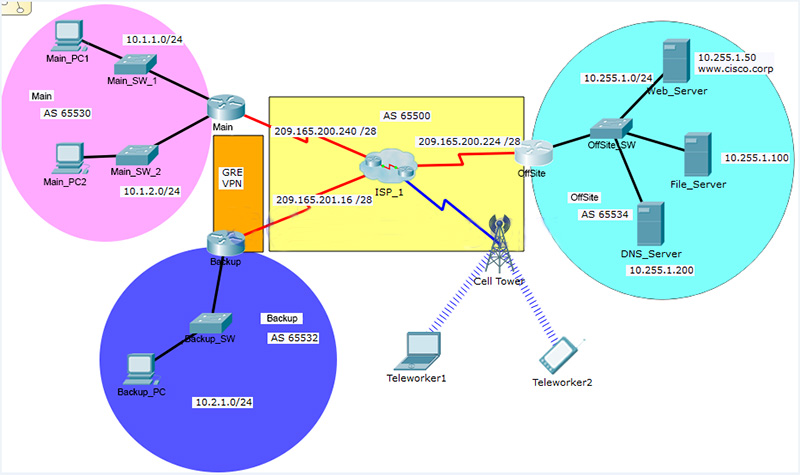
A few things to keep in mind while completing this activity:
- Do not use the browser Back button or close or reload any Exam windows during the exam.
- Do not close Packet Tracer when you are done. It will close automatically.
- Click the Submit Assessment button to submit your work.
Addressing Table
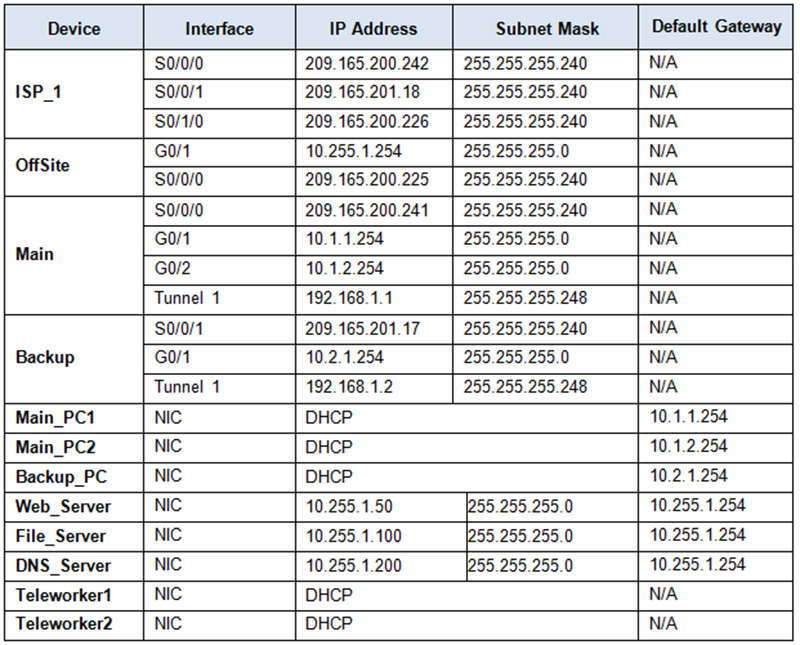
Note: All device console passwords are cisco. All device enable passwords are class.Step 1: Configure HDLC on router OffSite.
Configure the WAN link from router OffSite to ISP_1 using HDLC encapsulation.
Step 2: Configure PPP to connect Main to ISP_1.
Configure the WAN link from router Main to ISP_1 using PPP encapsulation and CHAP authentication.
- Create a user ISP_1 with the password of cisco123.
Step 3: Configure eBGP routing.
- Configure router Main with eBGP routing.
- Configure Main to peer with ISP_1.
- Add only Main 10.1.1.0/24 internal network to BGP.
- Configure router Backup with eBGP routing.
- Configure Backup to peer with ISP_1.
- Add the Backup internal network to BGP
Step 4: Configure GRE Tunneling.
- Configure router Main with a tunnel interface to send IP traffic over GRE to Backup.
- Configure Tunnel 1 with appropriate addressing information.
- Configure the tunnel source with the local exit interface.
- Configure the tunnel destination with the appropriate endpoint IP address.
- Configure router Backup with a tunnel interface to send IP traffic over GRE to Main.
- Configure Tunnel 1 with appropriate addressing information.
- Configure the tunnel source with the local exit interface.
- Configure the tunnel destination with the appropriate endpoint IP address.
Step 5: Configure OSPF Routing.
The Backup LAN must have connectivity to the Main LAN. Configure OSPF across the GRE tunnel.
- Configure OSPF process 10 on the Backup router.
- Backup should advertise the LAN network via OSPF.
- Backup should be configured to form an adjacency Main over the GRE tunnel.
- Disable OSPF updates on appropriate interface(s).
Step 6: Configure OSPF Routing.
The Main LAN must have connectivity to the Backup LAN. Configure OSPF across the GRE tunnel.
- Configure OSPF process 10 on the Main router.
- Main should advertise both LAN networks via OSPF.
- Main should be configured to form an adjacency with Backup over the GRE tunnel.
- Disable OSPF updates on appropriate interface(s).
Step 7: Connectivity.
- Verify full connectivity from Main_PC1 to the Web_Server in the OffSite network.
- Verify full connectivity from Teleworker1 to Web_Server in the OffSite network.
Answers:
Router: Secure / Storage / OffSite
User Access Verification

cisco  <~~~~Password is: cisco
en
class    <~~~~Password is: class
conf ter
int s0/0/0
encapsulation hdlc
Router: HQ / Corp / Main
User Access Verification

cisco  <~~~~Password is: cisco
en
class    <~~~~Password is: class
conf ter
username ISP_1 password cisco123
int s0/0/0
encapsulation ppp
ppp authentication chap
exit

router bgp 65530
network 10.1.1.0 mask 255.255.255.0
neighbor 209.165.200.242 remote-as 65500
exit


interface tunnel 1
ip address 192.168.1.1 255.255.255.248
tunnel source s0/0/0
tunnel destination 209.165.201.17
exit


router ospf 10
network 10.1.1.0 0.0.0.255 area 0
network 10.1.2.0 0.0.0.255 area 0
network 192.168.1.0 0.0.0.7 area 0
passive-interface g0/1
passive-interface g0/2
Router: Branch / Remote / Backup
User Access Verification

cisco  <~~~~Password is: cisco
en
class    <~~~~Password is: class
conf ter
router bgp 65532
network 10.2.1.0 mask 255.255.255.0
neighbor 209.165.201.18 remote-as 65500
exit

interface tunnel 1
ip address 192.168.1.2 255.255.255.248
tunnel source s0/0/1
tunnel destination 209.165.200.241
exit

router ospf 10
network 10.2.1.0 0.0.0.255 area 0
network 192.168.1.0 0.0.0.7 area 0
passive-interface g0/1
Also Read: CCNA 4 Chapter 3 2020 Edition Answers
Note: If you have the new question on this test, please comment Question and Multiple-Choice list in form below this article. We will update answers for you in the shortest time. Thank you! We truly value your contribution to the website.