


RSE Practice Skills Assessment Chapter 7 – Troubleshooting and Securing the Network Infrastructure. Ultimately, the assessment will measure the ability to configure routers and switches, verify connectivity, and make simple security enhancements to include password protection and port security. This will make it clear to the network engineer what the real applications look like and strengthen their ability to diagnose and repair common network problems.
Chapter 7 RSE Practice Skills Assessment
This is the CCNA Chapter 7 RSE Practice Skills Assessment exam with 100% correct answers:
Type 1
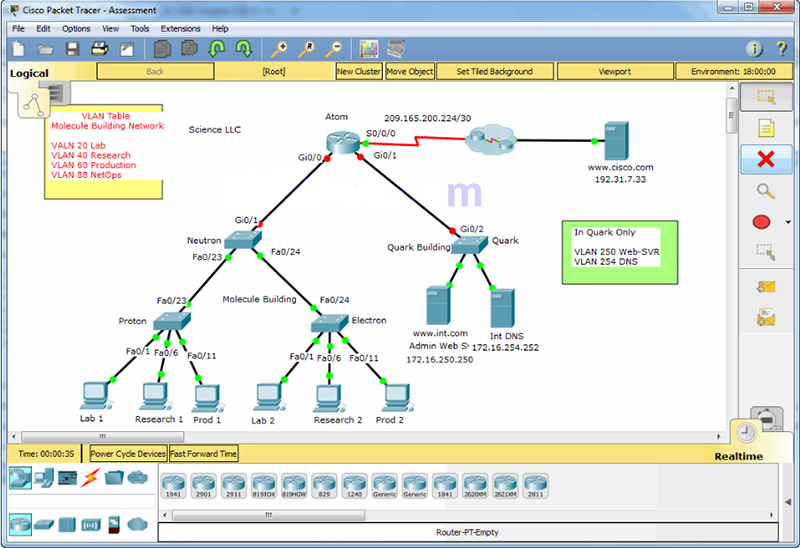
A few things to keep in mind while completing this activity:
- Do not use the browser Back button or close or reload any exam windows during the exam.
- Do not close Packet Tracer when you are done. It will close automatically.
- Click the Submit Assessment button in the browser window to submit your work.
Introduction
In this practice skills assessment, you will configure the Science LLC network with VLANs, Trunking, inter-VLAN routing, and IPv4 standard ACLs. As part of this process, you will perform basic VLAN configuration tasks, address router interfaces and hosts, and implement two ACLs.
You are not required to configure the Quark switch, or any of the servers.
Note: In order to keep the assessment activity as brief as possible, you will only be partially configuring some devices, as directed in the instructions. In a real network, all devices would be fully configured to function in the network. You are only responsible for completing the tasks covered in the instructions. Any configuration that you do beyond the requirements will not result in additional credit.
All IOS device configurations should be completed from a direct terminal connection to the device console. In addition, many values that are required to complete the configurations have not been given to you. In those cases, create the values that you need to complete the requirements.
You will practice and be assessed on the following skills:
- Configuration of initial device settings
- IPv4 address assignment
- Configuration and addressing of device interfaces
- Configuration of VLANs on three switches
- Configuration of trunking and inter-VLAN routing
- Configuration of ACL to limit device access
Requirements by device:
Router Atom:
- Configuration of initial router settings
- Interface configuration and IPv4 addressing
Switch Neutron:
- Configuration of VLANs
- Configuration of VLAN trunking
- Configuration of interfaces into VLAN
- Configuration of IP address for the Management VLAN
Switch Proton:
- Configuration of VLANs
- Configuration of VLAN trunking
- Configuration of interfaces into VLAN
- Configuration of IP address for the Management VLAN
Switch Electron:
- Configuration of VLANs
- Configuration of VLAN trunking
- Configuration of interfaces into VLAN
- Configuration of IP address for the Management VLAN
PC hosts:
- Pv4 full addressing
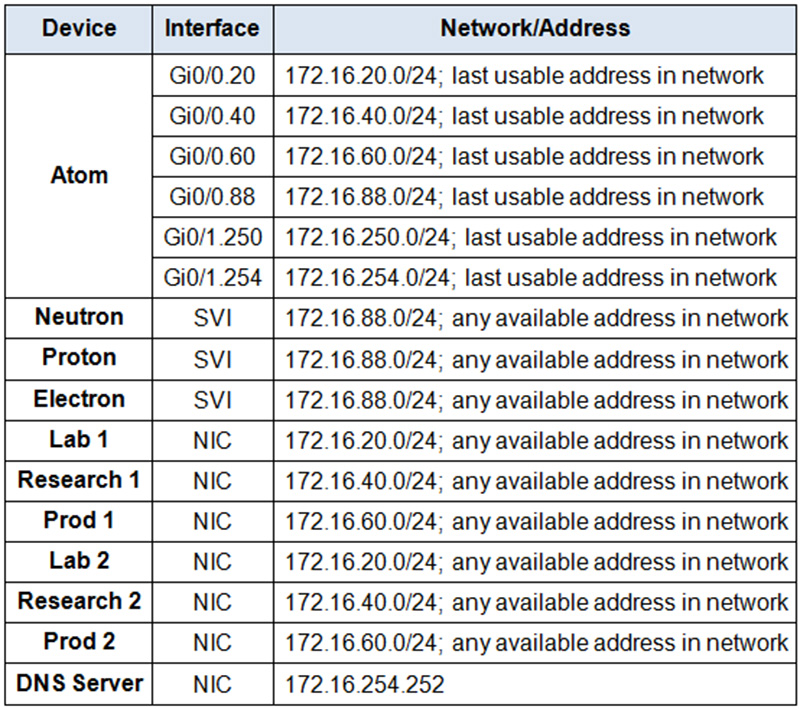
Addressing Table
Note: You are provided with the networks that interfaces should be configured on. Unless you are told to do differently in the detailed instructions below, you are free to choose the host addresses to assign.
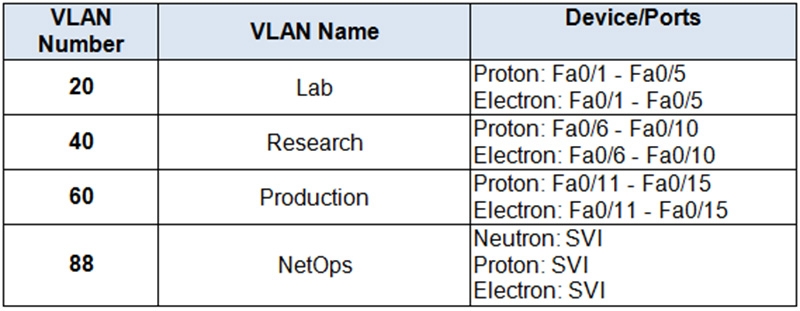
VLAN Assignment Table
Instructions
Step 1: Determine Addressing
Determine the IP addresses that you will use for the required interfaces on the three switch SVIs, and the six LAN hosts. Use the information in the addressing table.
- Select the switch SVI addresses.
- The interfaces on the Atomrouter that are used to route the VLANs should be addressed with the last usable IP address in the subnet.
- Assign valid host addresses to the LAN hosts according to the Addressing Table and VLAN assignment.
Step 2: Configure initial device setting on Neutron and Atom
Configure Neutron and Atom with all initial configurations that you have learned in the course so far:
- Configure the switch hostname: Neutron.
- Configure the router hostname: Atom.
- Prevent the router from attempting to resolve unrecognized CLI entries as domain names.
- Protect device configurations from unauthorized access with the encrypted password cisco.
- Secure the router and switch console and remote access lines with password cisco.
- Prevent all passwords from being viewed in clear text in device configuration files.
Step 3: Configure VLANs
Configure four VLANs on the Neutron, Proton, and Electron switches using the values in the addressing table.
Step 4: Assign Switch Interfaces to VLANs
Configure FastEthernet interfaces on Proton and Electron according to the following guidelines:
- Interfaces Fa0/1 – Fa0/5 are assigned to VLAN 20
- Interfaces Fa0/6 – Fa0/10 are assigned to VLAN 40
- Interfaces Fa0/11 – Fa0/15 are assigned to VLAN 60
Step 5: Configure the Switches for Remote Management
Configure the SVIs of the Neutron, Proton, and Electron switches using the information in the VLAN and Addressing Tables. Configure the IP address for the Management VLAN and the default-gateway IP address. Configure the SVIs so that they will be reachable by devices on other networks after the network has been fully configured.
Step 6: Configure VLAN Trunking
Configure VLAN trunking between the Neutron, Proton, and Electron switches.
- Manually configure the VTP domain name to School on the Neutron, Proton, and Electron switches.
- Manually configure the trunking ports on the Neutron, Proton, and Electron switches.
Step 7: Configure inter-VLAN Routing
Use the information in the Addressing and VLAN tables to configure inter-VLAN routing on Atom according to the following guidelines:
- Configure inter-VLAN routing among VLANs 20, 40, 60 and 88 through Gi0/0 subinterfaces.
- Configure inter-VLAN routing for VLANs 250 and 254 through Gi0/1 subinterfaces.
Step 8: Configure Host Addressing
Address the hosts according to the values in the addressing table. Use a DNS server address of 172.16.254.252. All hosts should be able to reach the www.cisco.com server.
Step 9: Configure Access Control Lists
You will configure two access control lists on the Atom router. The ACL specifications are as follows:
a. Restrict access to the vty lines on Atom.
Create a numbered standard ACL using number 10. Be sure that you use this number exactly as it appears in these instructions.
Allow only hosts on the Production VLAN to access the vty lines of Atom.
No other internal and Internet hosts should be able to access the vty lines of Atom.
Your solution should consist of a single ACL statement.
b. Restrict access to the internal web server
- Create a named standard ACL using the name INT-WEB. Be sure that you use this name exactly as it appears in these instructions.
- Allow hosts on the Research and Production VLANs to reach the internal administrative web server at int.com.
- No other internal and Internet hosts should be able to access the internal administrative web server.
- Your solution should consist of two ACL statements.
Step 10: Verify Connectivity
Verify your configurations according to the following guidelines:
- Hosts in VLANs 20, 40, and 60 can ping each other.
- Hosts in VLANs 20, 40, and 60 can visit the external web server www.cisco.com.
- Hosts in VLAN 40 and 60 can visit the administrative web server www.int.com.
- Hosts in VLAN 60 can telnet into Atom
- Hosts in VLANs 20 and 40 cannot telnet to Atom.
Intructions – Answer 100%
Router 1: Atom
enable
conf ter
hostname Atom
no ip domain-lookup
enable secret cisco

line console 0
password cisco
login

line vty 0 15
password cisco
login
exit

int g0/0.20
encapsulation dot1Q 20
ip address 172.16.20.254 255.255.255.0

int g0/0.40
encapsulation dot1Q 40
ip address 172.16.40.254 255.255.255.0

int g0/0.60
encapsulation dot1Q 60
ip address 172.16.60.254 255.255.255.0

int g0/0.88
encapsulation dot1Q 88
ip address 172.16.88.254 255.255.255.0

int g0/0
no sh

int g0/1.250
encapsulation dot1Q 250
ip address 172.16.250.254 255.255.255.0

int g0/1.254
encapsulation dot1Q 254
ip address 172.16.254.254 255.255.255.0

int g0/1
no shutdown
exit

access-list 10 permit 172.16.60.0 0.0.0.255
ip access-list standard INT-WEB
permit 172.16.40.0 0.0.0.255
permit 172.16.60.0 0.0.0.255

exit
line vty 0 15
access-class 10 in
exit

int g0/1.250
ip access-group INT-WEB out
Switch 1: Neutron
en
conf ter
hostname Neutron
no ip domain-lookup
enable secret cisco
line console 0
password cisco
login
line vty 0 15
password cisco
login
exit
service password-encryption
vlan 20
name Lab
vlan 40
name Research
vlan 60
name Production
vlan 88
name NetOps
exit

int vlan 88
ip add 172.16.88.253 255.255.255.0
no shutdown
exit
ip default-gateway 172.16.88.254
vtp domain School

int g0/1
switchport mode trunk
int range f0/23-24
switchport mode trunk
Switch 2: Proton
en
conf ter
hostname Proton
vlan 20
name Lab
vlan 40
name Research
vlan 60
name Production
vlan 88
name NetOps
exit

int range fastEthernet 0/1-5
switchport mode access
switchport access vlan 20
int range fastEthernet 0/6-10
switchport mode access
switchport access vlan 40
int range fastEthernet 0/11-15
switchport mode access
switchport access vlan 60
exit
int vlan 88
ip add 172.16.88.252 255.255.255.0
no sh
no shutdown
exit
ip default-gateway 172.16.88.254
vtp domain School

int f0/23
switchport mode trunk
Switch 3: Electron
en
conf ter
hostname Electron
vlan 20
name Lab
vlan 40
name Research
vlan 60
name Production
vlan 88
name NetOps
exit

int range fa0/1-5
switchport mode access
switchport access vlan 20
int range fa0/6-10
switchport mode access
switchport access vlan 40
int range fa0/11-15
switchport mode access
switchport access vlan 60
exit
int vlan 88
ip add 172.16.88.251 255.255.255.0
no shutdown
exit

ip default-gateway 172.16.88.254
vtp domain School

int f0/24
switchport mode trunk
Host: Lab 1
IP address: 172.16.20.5
Subnet mask: 255.255.255.0
Default gateway: 172.16.20.254
DNS server: 172.16.254.252
Host: Research 1
IP address: 172.16.40.5
Subnet mask: 255.255.255.0
Default gateway: 172.16.40.254
DNS server: 172.16.254.252
Host: Prod 1
IP address: 172.16.60.5
Subnet mask: 255.255.255.0
Default gateway: 172.16.60.254
DNS server: 172.16.254.252
Host: Lab 2
IP address: 172.16.20.10
Subnet mask: 255.255.255.0
Default gateway: 172.16.20.254
DNS server: 172.16.254.252
Host: Research 2
IP address: 172.16.40.10
Subnet mask: 255.255.255.0
Default gateway: 172.16.40.254
DNS server: 172.16.254.252
Host: Prod 1
IP address: 172.16.60.10
Subnet mask: 255.255.255.0
Default gateway: 172.16.60.254
DNS server: 172.16.254.252
Type 2
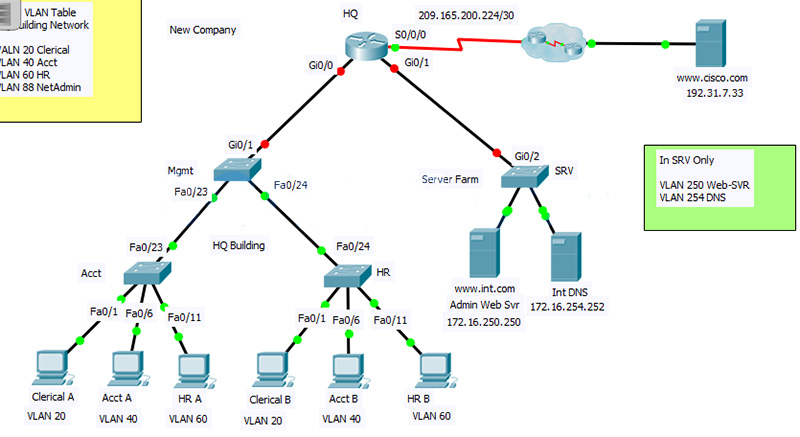
Intructions – Answer 100%
Router 1: HQ
enable
conf ter
hostname HQ
no ip domain-lookup
enable secret cisco

line console 0
password cisco
login

line vty 0 15
password cisco
login
exit

int g0/0.20
encapsulation dot1Q 20
ip address 172.16.20.254 255.255.255.0

int g0/0.40
encapsulation dot1Q 40
ip address 172.16.40.254 255.255.255.0

int g0/0.60
encapsulation dot1Q 60
ip address 172.16.60.254 255.255.255.0

int g0/0.88
encapsulation dot1Q 88
ip address 172.16.88.254 255.255.255.0

int g0/0
no sh

int g0/1.250
encapsulation dot1Q 250
ip address 172.16.250.254 255.255.255.0

int g0/1.254
encapsulation dot1Q 254
ip address 172.16.254.254 255.255.255.0

int g0/1
no shutdown
exit

access-list 10 permit 172.16.60.0 0.0.0.255
ip access-list standard INT-WEB
permit 172.16.40.0 0.0.0.255
permit 172.16.60.0 0.0.0.255

exit
line vty 0 15
access-class 10 in
exit

int g0/1.250
ip access-group INT-WEB out
Switch 1: Mgmt
en
conf ter
hostname Mgmt
no ip domain-lookup
enable secret cisco
line console 0
password cisco
login
line vty 0 15
password cisco
login
exit
service password-encryption
vlan 20
name Clerical
vlan 40
name Acct
vlan 60
name HR
vlan 88
name NetAdmin
exit

int vlan 88
ip add 172.16.88.253 255.255.255.0
no shutdown
exit
ip default-gateway 172.16.88.254
vtp domain School

int g0/1
switchport mode trunk
int range f0/23-24
switchport mode trunk
Switch 2: Acct
en
conf ter
hostname Acct
vlan 20
name Clerical
vlan 40
name Acct
vlan 60
name HR
vlan 88
name NetAdmin
exit

int range fastEthernet 0/1-5
switchport mode access
switchport access vlan 20
int range fastEthernet 0/6-10
switchport mode access
switchport access vlan 40
int range fastEthernet 0/11-15
switchport mode access
switchport access vlan 60
exit
int vlan 88
ip add 172.16.88.252 255.255.255.0
no sh
no shutdown
exit
ip default-gateway 172.16.88.254
vtp domain School

int f0/23
switchport mode trunk
Switch 3: HR
en
conf ter
hostname HR
vlan 20
name Clerical
vlan 40
name Acct
vlan 60
name HR
vlan 88
name NetAdmin
exit

int range fa0/1-5
switchport mode access
switchport access vlan 20
int range fa0/6-10
switchport mode access
switchport access vlan 40
int range fa0/11-15
switchport mode access
switchport access vlan 60
exit
int vlan 88
ip add 172.16.88.251 255.255.255.0
no shutdown
exit

ip default-gateway 172.16.88.254
vtp domain School

int f0/24
switchport mode trunk
Host: Clerical A
IP address: 172.16.20.5
Subnet mask: 255.255.255.0
Default gateway: 172.16.20.254
DNS server: 172.16.254.252
Host: Acct A
IP address: 172.16.40.5
Subnet mask: 255.255.255.0
Default gateway: 172.16.40.254
DNS server: 172.16.254.252
Host: HR A
IP address: 172.16.60.5
Subnet mask: 255.255.255.0
Default gateway: 172.16.60.254
DNS server: 172.16.254.252
Host: Clerical B
IP address: 172.16.20.10
Subnet mask: 255.255.255.0
Default gateway: 172.16.20.254
DNS server: 172.16.254.252
Host: Acct B
IP address: 172.16.40.10
Subnet mask: 255.255.255.0
Default gateway: 172.16.40.254
DNS server: 172.16.254.252
Host: HR B
IP address: 172.16.60.10
Subnet mask: 255.255.255.0
Default gateway: 172.16.60.254
DNS server: 172.16.254.252
Type 3
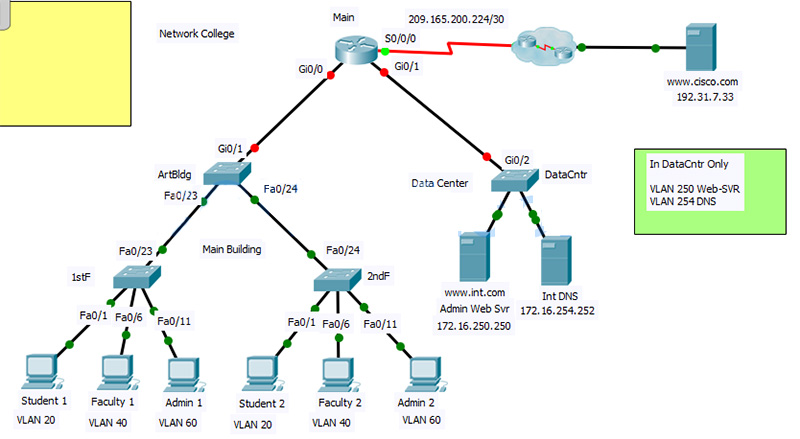
Intructions – Answer 100%
Router 1: Main
enable
conf ter
hostname Main
no ip domain-lookup
enable secret cisco

line console 0
password cisco
login

line vty 0 15
password cisco
login
exit

int g0/0.20
encapsulation dot1Q 20
ip address 172.16.20.254 255.255.255.0

int g0/0.40
encapsulation dot1Q 40
ip address 172.16.40.254 255.255.255.0

int g0/0.60
encapsulation dot1Q 60
ip address 172.16.60.254 255.255.255.0

int g0/0.88
encapsulation dot1Q 88
ip address 172.16.88.254 255.255.255.0

int g0/0
no sh

int g0/1.250
encapsulation dot1Q 250
ip address 172.16.250.254 255.255.255.0

int g0/1.254
encapsulation dot1Q 254
ip address 172.16.254.254 255.255.255.0

int g0/1
no shutdown
exit

access-list 10 permit 172.16.60.0 0.0.0.255
ip access-list standard INT-WEB
permit 172.16.40.0 0.0.0.255
permit 172.16.60.0 0.0.0.255

exit
line vty 0 15
access-class 10 in
exit

int g0/1.250
ip access-group INT-WEB out
Switch 1: ArtBldg
en
conf ter
hostname ArtBldg
no ip domain-lookup
enable secret cisco
line console 0
password cisco
login
line vty 0 15
password cisco
login
exit
service password-encryption
vlan 20
name Student
vlan 40
name Faculty
vlan 60
name Admin
vlan 88
name Management
exit

int vlan 88
ip add 172.16.88.253 255.255.255.0
no shutdown
exit
ip default-gateway 172.16.88.254
vtp domain School

int g0/1
switchport mode trunk
int range f0/23-24
switchport mode trunk
Switch 2: 1stF
en
conf ter
hostname 1stF
vlan 20
name Student
vlan 40
name Faculty
vlan 60
name Admin
vlan 88
name Management
exit

int range fastEthernet 0/1-5
switchport mode access
switchport access vlan 20
int range fastEthernet 0/6-10
switchport mode access
switchport access vlan 40
int range fastEthernet 0/11-15
switchport mode access
switchport access vlan 60
exit
int vlan 88
ip add 172.16.88.252 255.255.255.0
no sh
no shutdown
exit
ip default-gateway 172.16.88.254
vtp domain School

int f0/23
switchport mode trunk
Switch 3: 2ndF
en
conf ter
hostname 2ndF
vlan 20
name Student
vlan 40
name Faculty
vlan 60
name Admin
vlan 88
name Management
exit

int range fa0/1-5
switchport mode access
switchport access vlan 20
int range fa0/6-10
switchport mode access
switchport access vlan 40
int range fa0/11-15
switchport mode access
switchport access vlan 60
exit
int vlan 88
ip add 172.16.88.251 255.255.255.0
no shutdown
exit

ip default-gateway 172.16.88.254
vtp domain School

int f0/24
switchport mode trunk
Host: Student 1
IP address: 172.16.20.5
Subnet mask: 255.255.255.0
Default gateway: 172.16.20.254
DNS server: 172.16.254.252
Host: Faculty 1
IP address: 172.16.40.5
Subnet mask: 255.255.255.0
Default gateway: 172.16.40.254
DNS server: 172.16.254.252
Host: Admin 1
IP address: 172.16.60.5
Subnet mask: 255.255.255.0
Default gateway: 172.16.60.254
DNS server: 172.16.254.252
Host: Student 2
IP address: 172.16.20.10
Subnet mask: 255.255.255.0
Default gateway: 172.16.20.254
DNS server: 172.16.254.252
Host: Faculty 2
IP address: 172.16.40.10
Subnet mask: 255.255.255.0
Default gateway: 172.16.40.254
DNS server: 172.16.254.252
Host: Admin 2
IP address: 172.16.60.10
Subnet mask: 255.255.255.0
Default gateway: 172.16.60.254
DNS server: 172.16.254.252
Also Read: CCNA 2 Chapter 7 2020 Edition
Note: If you have the new question on this test, please comment Question and Multiple-Choice list in form below this article. We will update answers for you in the shortest time. Thank you! We truly value your contribution to the website.