CCNA 3 OSPF Practice Skills Assessment Exam Answer
The CCNA 3 OSPF Practice Skills Assessment tests the skills of students in configuring and troubleshooting OSPF in a simulated network environment. The skills emphasized here include router configurations, network addressing, configuring OSPF areas, and verifying the routing operations. This hands-on assessment enhances proper understanding of key OSPF concepts to apply in real-life networking scenarios and in passing Cisco certifications.
This is the CCNA 3 (v5.0 + v6.0) OSPF Practice Skills Assessment exam with 100% correct answers:
CCNA Routing and Switching – Scaling Networks – Type A
A few things to keep in mind while completing this activity:
Do not use the browser Back button or close or reload any exam windows during the exam.
Do not close Packet Tracer when you are done. It will close automatically.
Click the Submit Assessment button in the browser window to submit your work.
Introduction
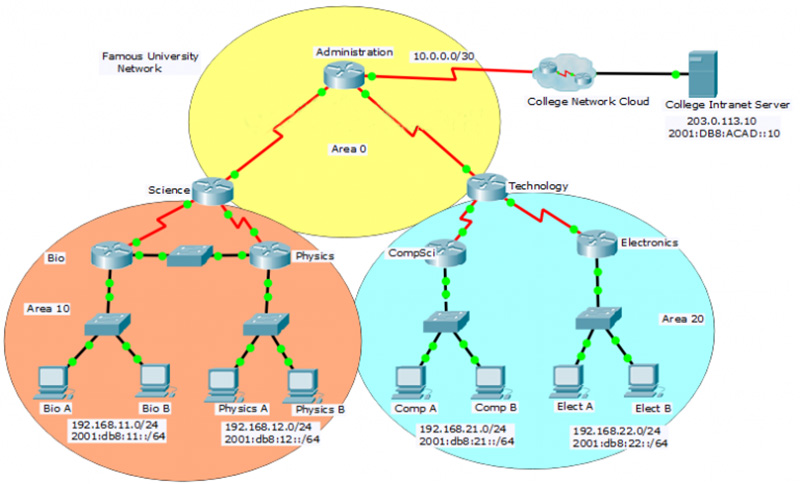
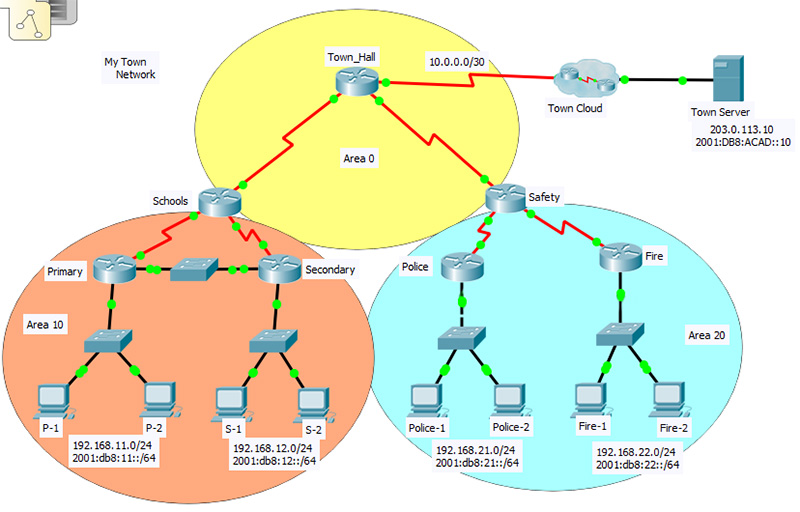
In this practice skills assessment, you will configure the Famous University network with OSPF routing. The network is configured with both IPv4 and IPv6 on all devices. This will allow you to implement routing in both OSPFv2 and OSPFv3. In addition, you will configure both versions of OSPF in multiple areas. For a full list of tasks, see below.
You are not required to configure the following:
The network switches
The network hosts
The College Intranet Server
The College Network Cloud
All IOS device configurations should be completed from a direct terminal connection to the device console.
You will practice and be assessed on the following skills:
Configuration of IPv4 and IPv6 default routes
Configuration of OSPFv2 in a single area
Configuration of OSPFv2 in multiple areas
Configuration of OSPFv3 in a single area
Configuration of OSPFv3 in multiple areas
Customization of OSPFv2 and OSPFv3 settings
Interface Bandwidth
OSPF Priority
OSPF timer settings
Passive interfaces
You will configure specific devices as follows:
Router Administration:
IPv4 and IPv6 default route configuration
OSPFv2 and OSPFv3 Area 0 configuration
Interface bandwidth configuration
OSPFv2 and OSPFv3 router ID configuration
Distribution of default routes
Auto-cost reference bandwidth configuration for OSPFv2 and OSPFv3
Router Science:
OSPFv2 and OSPFv3 Area 0 configuration
OSPFv2 and OSPFv3 Area 10 configuration
Interface bandwidth configuration
OSPFv2 and OSPFv3 router ID configuration
Auto-cost reference bandwidth configuration for OSPFv2 and OSPFv3
Router Bio:
OSPFv2 and OSPFv3 Area 10 configuration
OSPFv2 and OSPFv3 router ID configuration
Auto-cost reference bandwidth configuration for OSPFv2 and OSPFv3
OSPFv2 and OSPFv3 interface priority configuration
OSPFv2 and OSPFv3 hello and dead timer configuration
OSPFv2 and OSPFv3 passive interface configuration
Router Physics:
OSPFv2 and OSPFv3 Area 10 configuration
OSPFv2 and OSPFv3 router ID configuration
Auto-cost reference bandwidth configuration for OSPFv2 and OSPFv3
OSPFv2 and OSPFv3 interface priority configuration
OSPFv2 and OSPFv3 hello and dead timer configuration
OSPFv2 and OSPFv3 passive interface configuration
Router Technology:
OSPFv2 and OSPFv3 Area 0 configuration
OSPFv2 and OSPFv3 Area 20 configuration
Interface bandwidth configuration
OSPFv2 and OSPFv3 router ID configuration
Auto-cost reference bandwidth configuration for OSPFv2 and OSPFv3
Router CompSci:
OSPFv2 and OSPFv3 Area 20 configuration
OSPFv2 and OSPFv3 router ID configuration
Auto-cost reference bandwidth configuration for OSPFv2 and OSPFv3
OSPFv2 and OSPFv3 interface priority configuration
OSPFv2 and OSPFv3 hello and dead timer configuration
OSPFv2 and OSPFv3 passive interface configuration
Router Electronics:
OSPFv2 and OSPFv3 Area 20 configuration
OSPFv2 and OSPFv3 router ID configuration
Auto-cost reference bandwidth configuration for OSPFv2 and OSPFv3
OSPFv2 and OSPFv3 interface priority configuration
OSPFv2 and OSPFv3 hello and dead timer configuration
OSPFv2 and OSPFv3 passive interface configuration
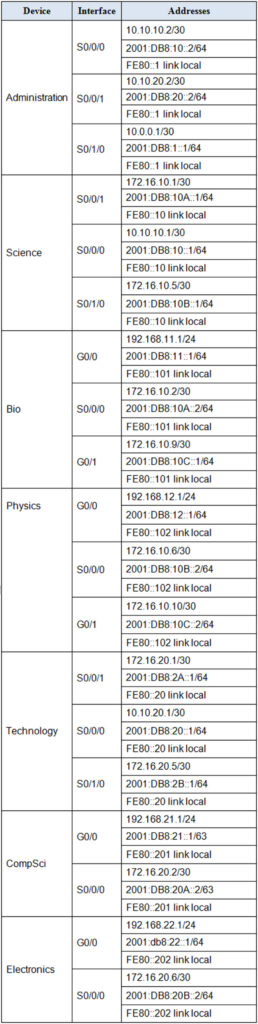
Addressing Table
Use the following addresses to configure the network. Some addresses are preconfigured on devices that you are not required to configure, and are provided for reference purposes only.
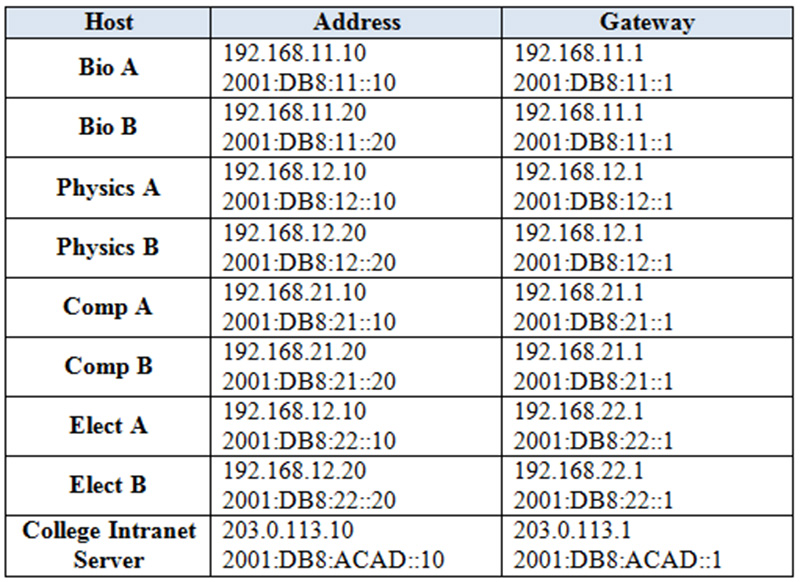
Host Address Table
The addresses of the PC and server hosts are provided for connectivity testing purposes. All addressing is preconfigured.
Instructions
Step1: Configure default static routes on the Administration router.
Configure IPv4 and IPv6 default static routes on Administration. Use the exit interface value in your configuration.
Step 2: Configure single-area OSPFv2
On the Administration, Science, and Technology routers, configure single-area OSPFv2 in Area 0.
a. Use a process ID of 10 for all OSPFv2 processes.
b. Activate routing for the appropriate networks. Use inverse masks that specify only addresses within the networks.
c. Specify a bandwidth value that matches the clock speed of the interfaces of Administration for interfaces of all devices that are configured in Area 0.
Configure the routers that have all interfaces in Areas 10 and 20 with OSPFv2.
a. Use a process ID of 10 for all OSPF processes.
b. Activate routing for the appropriate networks. Use inverse masks that specify only addresses within the networks. After this step is completed, hosts on all LANs should be able to communicate with each other over IPv4.
Configure the routers that have all interfaces in Areas 10 and 20 with OSPFv3.
a. Enable the routers to route IPv6.
b. Use a process ID of 10 for all OSPF processes.
c. Activate routing for the appropriate networks. After this step is completed, hosts on all LANs should be able to communicate with each other over IPv6.
a. For the multiaccess network connected between the Bio and Physics routers, configure priorities so that Bio will become the DR and Physics will be the BDR. Use priority values of 255 and 200.
b. Configure the interfaces on all routers that are attached to LANs with hosts to not send OSPFv2 traffic into the LAN.
c. Enable all routers to automatically and accurately calculate costs for routes that include 1Gbps Ethernet networks by changing the reference bandwidth.
d. Configure OSPFv2 so that the default routes that are configured on Administration are automatically distributed to all routers in the network.
e. Adjust the OSPFv2 timers on the Ethernet link between Bio and Physics as follows:
Hello: 5 seconds Dead: 20 seconds
Step 7: Customize OSPFv3.
Customize OSPFv3 operation as follows:
a. For the multiaccess network connected between the Bio and Physics routers configure priorities so that Bio will become the DR and Physics will be the BDR. Use priority values of 255 and 200.
b. Configure the interfaces on all routers that are attached to LANs with hosts to not send OSPFv3 traffic into the LAN.
c. Enable all routers to automatically and accurately calculate costs for routes that include 1Gbps Ethernet networks by changing the reference bandwidth.
d. Configure OSPFv3 so that the default routes that are configured on Administration are automatically distributed to all routers in the network.
e. Explicitly configure the OSPFv3 timers on the Ethernet link between Bio and Physics as follows:
Hello: 5 seconds Dead: 20 seconds
Connect the PC to the Switch/Router using a Console cable
Hint: Copy and Paste script for each router and switch into User EXEC mode
Router: Administration / HQ / Town-HalL
en
conf terminal
ip route 0.0.0.0 0.0.0.0 s0/1/0
ipv6 unicast-routing
ipv6 route ::/0 s0/1/0

router ospf 10
network 10.10.10.0 0.0.0.3 area 0
network 10.10.20.0 0.0.0.3 area 0
router-id 10.20.0.0
do clear ip ospf process
yes
exit

int s0/0/0
bandwidth 128
int s0/0/1
bandwidth 128
exit

int s0/0/0
ipv6 ospf 10 area 0

int s0/0/1
ipv6 ospf 10 area 0
exit

Ipv6 router ospf 10
router-id 10.20.0.0
do clear ipv6 ospf process
yes
exit

router ospf 10
auto-cost reference-bandwidth 1000
exit

router ospf 10
default-information originate
exit

ipv6 router ospf 10
default-information originate
exit

ipv6 router ospf 10
auto-cost reference-bandwidth 1000
Router: Science / London / Schools:
EN
conf ter
router ospf 10
network 10.10.10.0 0.0.0.3 area 0
network 172.16.10.0 0.0.0.3 area 10
network 172.16.10.4 0.0.0.3  area 10
router-id 10.0.0.0
do clear ip ospf process
yes
exit
ipv6 unicast-routing

Int s0/0/0
Ipv6 ospf 10 area 0
exit

Int s0/0/1
Ipv6 ospf 10 area 10
exit

Int s0/1/0
Ipv6 ospf 10 area 10
exit

int s0/0/0
bandwidth 128
exit

ipv6 router ospf 10
router-id 10.0.0.0
do clear ipv6 ospf process
yes
exit
ipv6 router ospf 10
auto-cost reference-bandwidth 1000
exit
router ospf 10
auto-cost reference-bandwidth 1000
Router: Technology / Dubai / Safety
en
conf ter
Router ospf 10
network 10.10.20.0 0.0.0.3 area 0
network 172.16.20.0 0.0.0.3 area 20
network 172.16.20.4 0.0.0.3  area 20
router-id 20.0.0.0
do clear ip ospf process
yes

exit
ipv6 unicast-routing

Int s0/0/0
Ipv6 ospf 10 area 0
exit

Int s0/0/1
Ipv6 ospf 10 area 20
exit

Int s0/1/0
Ipv6 ospf 10 area 20
exit

int s0/0/0
bandwidth 128
exit

Ipv6 router ospf 10
router-id 20.0.0.0
do clear ipv6 ospf process
yes
exit

router ospf 10
auto-cost reference-bandwidth 1000
exit
ipv6 router ospf 10
auto-cost reference-bandwidth 1000
Router: Bio / West / Primary
en
conf ter
router ospf 10
network 172.16.10.0 0.0.0.3 area 10
network 192.168.11.0 0.0.0.255 area 10
network 172.16.10.8 0.0.0.3  area 10
router-id 10.1.1.1
do clear ip ospf process
yes
exit

ipv6 unicast-routing
int s0/0/0
ipv6 ospf 10 area 10
exit

int g0/0
ipv6 ospf 10 area 10
exit

int g0/1
ipv6 ospf 10 area 10
exit

ipv6 router ospf 10
router-id 10.1.1.1
do clear ipv6 ospf process
yes
exit

int g0/1
ip ospf priority 255
exit

router ospf 10
passive-interface g0/0
exit
router ospf 10
auto-cost reference-bandwidth 1000
exit

int g0/1
ip ospf hello-interval 5
ip ospf dead-interval 20
exit

int g0/1
ipv6 ospf priority 255
exit

ipv6 router ospf 10
passive-interface g0/0
exit

int g0/1
ipv6 ospf hello-interval 5
ipv6 ospf dead-interval 20
exit

ipv6 router ospf 10
auto-cost reference-bandwidth 1000
Router: Physics / East / Secondary
en
conf ter
Router ospf 10
network 172.16.10.4 0.0.0.3 area 10
network 172.16.10.8 0.0.0.3 area 10
network 192.168.12.0 0.0.0.255 area 10
router-id 10.2.2.2
do clear ip ospf process
yes
exit
ipv6 unicast-routing
int s0/0/0
ipv6 ospf 10 area 10
exit

int g0/0
ipv6 ospf 10 area 10
exit

int g0/1
ipv6 ospf 10 area 10
exit


ipv6 router ospf 10
router-id 10.2.2.2
do clear ip ospf process
yes
exit

int g0/1
ip ospf priority 200
exit

router ospf 10
passive-interface g0/0
exit

router ospf 10
auto-cost reference-bandwidth 1000
exit

int g0/1
ip ospf hello-interval 5
ip ospf dead-interval 20
exit

int g0/1
ipv6 ospf priority 200
exit

ipv6 router ospf 10
passive-interface g0/0
exit

int g0/1
ipv6 ospf hello-interval 5
ipv6 ospf dead-interval 20
exit

ipv6 router ospf 10
auto-cost reference-bandwidth 1000
Router: CompSci / Central / Police
en
conf ter
Router ospf 10
network 172.16.20.0 0.0.0.3 area 20
network 192.168.21.0 0.0.0.255 area 20
router-id 20.1.1.1
do clear ip ospf process
yes

exit
ipv6 unicast-routing
int s0/0/0
ipv6 ospf 10 area 20
exit

int g0/0
ipv6 ospf 10 area 20
exit

ipv6 router ospf 10
router-id 20.1.1.1
do clear ipv6 ospf process
yes

exit
router ospf 10

passive-interface g0/0
exit
ipv6 router ospf 10
passive-interface g0/0
exit

router ospf 10
auto-cost reference-bandwidth 1000

exit
ipv6 router ospf 10
auto-cost reference-bandwidth 1000
Router: Electronics / Remote / Fire
en
conf ter
Router ospf 10
network 172.16.20.4 0.0.0.3 area 20
network 192.168.22.0 0.0.0.255 area 20
router-id 20.2.2.2
do clear ip ospf process
yes
exit
ipv6 unicast-routing
int s0/0/0
ipv6 ospf 10 area 20
exit

int g0/0
ipv6 ospf 10 area 20
exit

ipv6 router ospf 10
router-id 20.2.2.2
do clear ipv6 ospf process
yes
exit

router ospf 10
passive-interface g0/0
exit

ipv6 router ospf 10
passive-interface g0/0
exit

router ospf 10
auto-cost reference-bandwidth 1000
exit

ipv6 router ospf 10
auto-cost reference-bandwidth 1000
CCNA Routing and Switching – Scaling Networks – Type B
Connect the PC to the Switch/Router using a Console cable
Hint: Copy and Paste script for each router and switch into User EXEC mode
Router: Administration / HQ / Town-HalL
en
conf terminal
ip route 0.0.0.0 0.0.0.0 s0/1/0
ipv6 unicast-routing
ipv6 route ::/0 s0/1/0

router ospf 10
network 10.10.10.0 0.0.0.3 area 0
network 10.10.20.0 0.0.0.3 area 0
router-id 10.20.0.0
do clear ip ospf process
yes
exit

int s0/0/0
bandwidth 128
int s0/0/1
bandwidth 128
exit

int s0/0/0
ipv6 ospf 10 area 0

int s0/0/1
ipv6 ospf 10 area 0
exit

Ipv6 router ospf 10
router-id 10.20.0.0
do clear ipv6 ospf process
yes
exit

router ospf 10
auto-cost reference-bandwidth 1000
exit

router ospf 10
default-information originate
exit

ipv6 router ospf 10
default-information originate
exit

ipv6 router ospf 10
auto-cost reference-bandwidth 1000
Router: Science / London / Schools
EN
conf ter
router ospf 10
network 10.10.10.0 0.0.0.3 area 0
network 172.16.10.0 0.0.0.3 area 10
network 172.16.10.4 0.0.0.3  area 10
router-id 10.0.0.0
do clear ip ospf process
yes
exit
ipv6 unicast-routing

Int s0/0/0
Ipv6 ospf 10 area 0
exit

Int s0/0/1
Ipv6 ospf 10 area 10
exit

Int s0/1/0
Ipv6 ospf 10 area 10
exit

int s0/0/0
bandwidth 128
exit

ipv6 router ospf 10
router-id 10.0.0.0
do clear ipv6 ospf process
yes
exit
ipv6 router ospf 10
auto-cost reference-bandwidth 1000
exit
router ospf 10
auto-cost reference-bandwidth 1000
Router: Technology / Dubai / Safety
en
conf ter
Router ospf 10
network 10.10.20.0 0.0.0.3 area 0
network 172.16.20.0 0.0.0.3 area 20
network 172.16.20.4 0.0.0.3  area 20
router-id 20.0.0.0
do clear ip ospf process
yes

exit
ipv6 unicast-routing

Int s0/0/0
Ipv6 ospf 10 area 0
exit

Int s0/0/1
Ipv6 ospf 10 area 20
exit

Int s0/1/0
Ipv6 ospf 10 area 20
exit

int s0/0/0
bandwidth 128
exit

Ipv6 router ospf 10
router-id 20.0.0.0
do clear ipv6 ospf process
yes
exit

router ospf 10
auto-cost reference-bandwidth 1000
exit
ipv6 router ospf 10
auto-cost reference-bandwidth 1000
Router: Bio / West / Primary
en
conf ter
router ospf 10
network 172.16.10.0 0.0.0.3 area 10
network 192.168.11.0 0.0.0.255 area 10
network 172.16.10.8 0.0.0.3  area 10
router-id 10.1.1.1
do clear ip ospf process
yes
exit

ipv6 unicast-routing
int s0/0/0
ipv6 ospf 10 area 10
exit

int g0/0
ipv6 ospf 10 area 10
exit

int g0/1
ipv6 ospf 10 area 10
exit

ipv6 router ospf 10
router-id 10.1.1.1
do clear ipv6 ospf process
yes
exit

int g0/1
ip ospf priority 255
exit

router ospf 10
passive-interface g0/0
exit
router ospf 10
auto-cost reference-bandwidth 1000
exit

int g0/1
ip ospf hello-interval 5
ip ospf dead-interval 20
exit

int g0/1
ipv6 ospf priority 255
exit

ipv6 router ospf 10
passive-interface g0/0
exit

int g0/1
ipv6 ospf hello-interval 5
ipv6 ospf dead-interval 20
exit

ipv6 router ospf 10
auto-cost reference-bandwidth 1000
Router: Physics / East / Secondary
en
conf ter
Router ospf 10
network 172.16.10.4 0.0.0.3 area 10
network 172.16.10.8 0.0.0.3 area 10
network 192.168.12.0 0.0.0.255 area 10
router-id 10.2.2.2
do clear ip ospf process
yes
exit
ipv6 unicast-routing
int s0/0/0
ipv6 ospf 10 area 10
exit

int g0/0
ipv6 ospf 10 area 10
exit

int g0/1
ipv6 ospf 10 area 10
exit


ipv6 router ospf 10
router-id 10.2.2.2
do clear ip ospf process
yes
exit

int g0/1
ip ospf priority 200
exit

router ospf 10
passive-interface g0/0
exit

router ospf 10
auto-cost reference-bandwidth 1000
exit

int g0/1
ip ospf hello-interval 5
ip ospf dead-interval 20
exit

int g0/1
ipv6 ospf priority 200
exit

ipv6 router ospf 10
passive-interface g0/0
exit

int g0/1
ipv6 ospf hello-interval 5
ipv6 ospf dead-interval 20
exit

ipv6 router ospf 10
auto-cost reference-bandwidth 1000
Router: CompSci / Central / Police
en
conf ter
Router ospf 10
network 172.16.20.0 0.0.0.3 area 20
network 192.168.21.0 0.0.0.255 area 20
router-id 20.1.1.1
do clear ip ospf process
yes

exit
ipv6 unicast-routing
int s0/0/0
ipv6 ospf 10 area 20
exit

int g0/0
ipv6 ospf 10 area 20
exit

ipv6 router ospf 10
router-id 20.1.1.1
do clear ipv6 ospf process
yes

exit
router ospf 10

passive-interface g0/0
exit
ipv6 router ospf 10
passive-interface g0/0
exit

router ospf 10
auto-cost reference-bandwidth 1000

exit
ipv6 router ospf 10
auto-cost reference-bandwidth 1000
Router: Electronics / Remote / Fire
en
conf ter
Router ospf 10
network 172.16.20.4 0.0.0.3 area 20
network 192.168.22.0 0.0.0.255 area 20
router-id 20.2.2.2
do clear ip ospf process
yes
exit
ipv6 unicast-routing
int s0/0/0
ipv6 ospf 10 area 20
exit

int g0/0
ipv6 ospf 10 area 20
exit

ipv6 router ospf 10
router-id 20.2.2.2
do clear ipv6 ospf process
yes
exit

router ospf 10
passive-interface g0/0
exit

ipv6 router ospf 10
passive-interface g0/0
exit

router ospf 10
auto-cost reference-bandwidth 1000
exit

ipv6 router ospf 10
auto-cost reference-bandwidth 1000
CCNA Routing and Switching – Scaling Networks – Type C
Connect the PC to the Switch/Router using a Console cable
Hint: Copy and Paste script for each router and switch into User EXEC mode
Router: Administration / HQ / Town-HalL
en
conf terminal
ip route 0.0.0.0 0.0.0.0 s0/1/0
ipv6 unicast-routing
ipv6 route ::/0 s0/1/0

router ospf 10
network 10.10.10.0 0.0.0.3 area 0
network 10.10.20.0 0.0.0.3 area 0
router-id 10.20.0.0
do clear ip ospf process
yes
exit

int s0/0/0
bandwidth 128
int s0/0/1
bandwidth 128
exit

int s0/0/0
ipv6 ospf 10 area 0

int s0/0/1
ipv6 ospf 10 area 0
exit

Ipv6 router ospf 10
router-id 10.20.0.0
do clear ipv6 ospf process
yes
exit

router ospf 10
auto-cost reference-bandwidth 1000
exit

router ospf 10
default-information originate
exit

ipv6 router ospf 10
default-information originate
exit

ipv6 router ospf 10
auto-cost reference-bandwidth 1000
Router: Science / London / Schools
EN
conf ter
router ospf 10
network 10.10.10.0 0.0.0.3 area 0
network 172.16.10.0 0.0.0.3 area 10
network 172.16.10.4 0.0.0.3  area 10
router-id 10.0.0.0
do clear ip ospf process
yes
exit
ipv6 unicast-routing

Int s0/0/0
Ipv6 ospf 10 area 0
exit

Int s0/0/1
Ipv6 ospf 10 area 10
exit

Int s0/1/0
Ipv6 ospf 10 area 10
exit

int s0/0/0
bandwidth 128
exit

ipv6 router ospf 10
router-id 10.0.0.0
do clear ipv6 ospf process
yes
exit
ipv6 router ospf 10
auto-cost reference-bandwidth 1000
exit
router ospf 10
auto-cost reference-bandwidth 1000
Router: Technology / Dubai / Safety
en
conf ter
Router ospf 10
network 10.10.20.0 0.0.0.3 area 0
network 172.16.20.0 0.0.0.3 area 20
network 172.16.20.4 0.0.0.3  area 20
router-id 20.0.0.0
do clear ip ospf process
yes

exit
ipv6 unicast-routing

Int s0/0/0
Ipv6 ospf 10 area 0
exit

Int s0/0/1
Ipv6 ospf 10 area 20
exit

Int s0/1/0
Ipv6 ospf 10 area 20
exit

int s0/0/0
bandwidth 128
exit

Ipv6 router ospf 10
router-id 20.0.0.0
do clear ipv6 ospf process
yes
exit

router ospf 10
auto-cost reference-bandwidth 1000
exit
ipv6 router ospf 10
auto-cost reference-bandwidth 1000
Router: Bio / West / Primary
en
conf ter
router ospf 10
network 172.16.10.0 0.0.0.3 area 10
network 192.168.11.0 0.0.0.255 area 10
network 172.16.10.8 0.0.0.3  area 10
router-id 10.1.1.1
do clear ip ospf process
yes
exit

ipv6 unicast-routing
int s0/0/0
ipv6 ospf 10 area 10
exit

int g0/0
ipv6 ospf 10 area 10
exit

int g0/1
ipv6 ospf 10 area 10
exit

ipv6 router ospf 10
router-id 10.1.1.1
do clear ipv6 ospf process
yes
exit

int g0/1
ip ospf priority 255
exit

router ospf 10
passive-interface g0/0
exit
router ospf 10
auto-cost reference-bandwidth 1000
exit

int g0/1
ip ospf hello-interval 5
ip ospf dead-interval 20
exit

int g0/1
ipv6 ospf priority 255
exit

ipv6 router ospf 10
passive-interface g0/0
exit

int g0/1
ipv6 ospf hello-interval 5
ipv6 ospf dead-interval 20
exit

ipv6 router ospf 10
auto-cost reference-bandwidth 1000
Router: Physics / East / Secondary
en
conf ter
Router ospf 10
network 172.16.10.4 0.0.0.3 area 10
network 172.16.10.8 0.0.0.3 area 10
network 192.168.12.0 0.0.0.255 area 10
router-id 10.2.2.2
do clear ip ospf process
yes
exit
ipv6 unicast-routing
int s0/0/0
ipv6 ospf 10 area 10
exit

int g0/0
ipv6 ospf 10 area 10
exit

int g0/1
ipv6 ospf 10 area 10
exit


ipv6 router ospf 10
router-id 10.2.2.2
do clear ip ospf process
yes
exit

int g0/1
ip ospf priority 200
exit

router ospf 10
passive-interface g0/0
exit

router ospf 10
auto-cost reference-bandwidth 1000
exit

int g0/1
ip ospf hello-interval 5
ip ospf dead-interval 20
exit

int g0/1
ipv6 ospf priority 200
exit

ipv6 router ospf 10
passive-interface g0/0
exit

int g0/1
ipv6 ospf hello-interval 5
ipv6 ospf dead-interval 20
exit

ipv6 router ospf 10
auto-cost reference-bandwidth 1000
Router: CompSci / Central / Police
en
conf ter
Router ospf 10
network 172.16.20.0 0.0.0.3 area 20
network 192.168.21.0 0.0.0.255 area 20
router-id 20.1.1.1
do clear ip ospf process
yes

exit
ipv6 unicast-routing
int s0/0/0
ipv6 ospf 10 area 20
exit

int g0/0
ipv6 ospf 10 area 20
exit

ipv6 router ospf 10
router-id 20.1.1.1
do clear ipv6 ospf process
yes

exit
router ospf 10

passive-interface g0/0
exit
ipv6 router ospf 10
passive-interface g0/0
exit

router ospf 10
auto-cost reference-bandwidth 1000

exit
ipv6 router ospf 10
auto-cost reference-bandwidth 1000
Router: Electronics / Remote / Fire
en
conf ter
Router ospf 10
network 172.16.20.4 0.0.0.3 area 20
network 192.168.22.0 0.0.0.255 area 20
router-id 20.2.2.2
do clear ip ospf process
yes
exit
ipv6 unicast-routing
int s0/0/0
ipv6 ospf 10 area 20
exit

int g0/0
ipv6 ospf 10 area 20
exit

ipv6 router ospf 10
router-id 20.2.2.2
do clear ipv6 ospf process
yes
exit

router ospf 10
passive-interface g0/0
exit

ipv6 router ospf 10
passive-interface g0/0
exit

router ospf 10
auto-cost reference-bandwidth 1000
exit

ipv6 router ospf 10
auto-cost reference-bandwidth 1000
Note: If you have the new question on this test, please comment Question and Multiple-Choice list in form below this article. We will update answers for you in the shortest time. Thank you! We truly value your contribution to the website.